• Skip to primary navigation
  • Skip to main content
  • Skip to primary sidebar
  • Get A Quote
  • 610.743.5602
  • Schedule A Meeting
default-logo
Menu
  • About
    • Team
    • Careers
    • Work
    • Who Do We Serve
  • HubSpot Agency
    • Marketing Hub
      • Setup & Strategy
        • Inbound Success Plan
        • Inbound Marketing Plans
      • Traffic Generation
      • Lead Conversion
      • Lead Nurturing
    • Sales Hub
      • CRM Implementation
      • Sales Enablement
      • Sales & Marketing Alignment
    • Content Hub
  • Digital Marketing
    • Inbound Marketing
      • Inbound Marketing Plans
    • Content Marketing
    • Email Marketing
    • SEO
    • Social Media Marketing
    • PPC Management
  • Digital Analytics
  • Web Design
    • Shopify Web Design
    • CMS Hub
    • Branding/Graphic Design
    • Our Work
    • Hosting & Maintenance
  • Blog
    • Small & Mid-Sized Business Resources
    • Client Referral Program
  • About
    • Team
    • Careers
    • Work
    • Who Do We Serve
  • HubSpot Agency
    • Marketing Hub
      • Setup & Strategy
        • Inbound Success Plan
        • Inbound Marketing Plans
      • Traffic Generation
      • Lead Conversion
      • Lead Nurturing
    • Sales Hub
      • CRM Implementation
      • Sales Enablement
      • Sales & Marketing Alignment
    • Content Hub
  • Digital Marketing
    • Inbound Marketing
      • Inbound Marketing Plans
    • Content Marketing
    • Email Marketing
    • SEO
    • Social Media Marketing
    • PPC Management
  • Digital Analytics
  • Web Design
    • Shopify Web Design
    • CMS Hub
    • Branding/Graphic Design
    • Our Work
    • Hosting & Maintenance
  • Blog
    • Small & Mid-Sized Business Resources
    • Client Referral Program

Dabrian Marketing Group

Commercial vs Open Source CMS

October 1, 2015 by Dabrian Marketing Group Leave a Comment

What is a Content Management System (CMS)?

A content management system (CMS) is an interface that a user can log into and allows publishing, editing and modifying content, organizing, and deleting as well as maintenance from a central interface. Such systems of content management provide procedures to manage workflow in a collaborative environment. It also allows you to do all of that in an environment that does not require you to know code. Open Source Content Management Systems account for roughly 50% of all websites that exist. There are lots of different kinds of Content Management Systems, but we will be talking about 2 different kinds that most, if not, all Content Management Systems fall under.

What is a Commercial Content Management System?

Commercial refers to being the opposite of free to use, meaning you must pay to use the software. For example, when you buy “Microsoft Office Word” you can’t edit the code to modify it. Depending on how you look at it, it can be a good or bad thing. Using commercial software always means you must use their software and use what they provide and that nothing else is compatible with it other than what they offer. For example, if you wanted to integrate Salesforce with your site, chances are you wouldn’t be able to because the features most likely would not be there.

What is Open Source Content Management System?

Open source refers to that anyone can use it for free. Most times you are able to literally open it up and edit their code and modify it as you like. Depending how extensive the changes are, you could release those changes as an attachment / plugin for free or paid. The big factor in using an open source Content Management System is that it has the backing of a community, and if you want something, chances are you can find a plugin / attachment that is already made and tested and that gives you the functionality that you want. Now that we know what they are, let’s get down to what the differences actually are.

Advantages of Using Open Source CMS

Let’s start off with the advantages of open source Content Management Systems (CMS). There are a lot of advantages, but we are going to focus on some of the main topics on why users usually choose to use open source. Since open source is free to use, that is probably the biggest reason anyone uses it. Another reason is that it is backed by a community of users that regularly provide support / updates / help on the software to achieve your end goal. Another advantage of open source it that anyone can make changes to it so that means you can customize it to fit your different needs making it more flexible.

A big reason why users usually use open source is because they have a lot of other software they want to work with their site. Security is usually a big concern and often a misconception that open source does not mean secure. If your site is in the right hands, than it can be made as secure as commercial software.
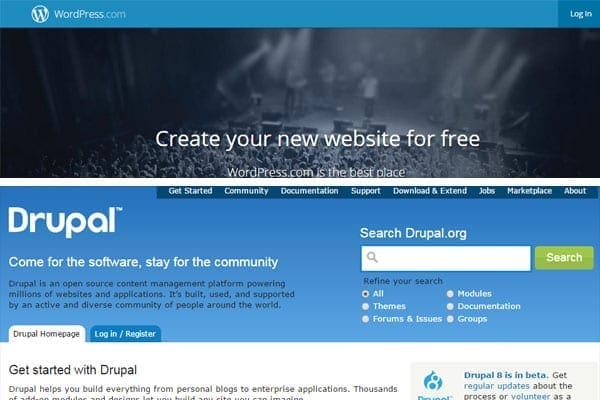
popular open source CMS’s (wordpress, drupal)
Popular open source CMS (WordPress, Drupal)

Advantages of Using Commercial CMS

The main reason a company wants to use commercial software is because they are worried about security, which is a good concern. Commercial definitely has you secure from the start. That is something you don’t need to worry about. Since it is developed by only 1 company and not a community it often has a  clearer path of where the software is going and what it will include next. Since the software is developed by one company that means they have a definite line of support for you to reach.

Conclusion

That was a brief overview of the differences of commercial Content Management Systems (CMS) and open source Content Management Systems (CMS). Commercial Content Management System usually is the choice if you want assurance of security and support. If you are looking for a cheaper option, you can go with Open Source Content Management System (CMS). It can be as secure as a Commercial CMS, plenty of integrations, community support and best of all it’s free!
Which Content Management System do you prefer to use if you use one? Fire in the comments below!

Filed Under: Financial Services, Web Design, Web Security

5 Facts that Impact Holiday Shopping Advertising

September 29, 2015 by Dabrian Marketing Group Leave a Comment

The impending Holiday season is upon us. Is your business ready to compete for your consumers attention? A recent article from Google noted that Holiday shopping, advertising research, and purchasing begins to see more and more upwards momentum beginning in August. Mothers, Fathers, and Brother-in-Laws all alike are searching for “Christmas ideas” and “meaningful gifts.” With this ever changing and growing capitalistic world at our fingertips, how can your business hold your customer’s attention and gain sales?

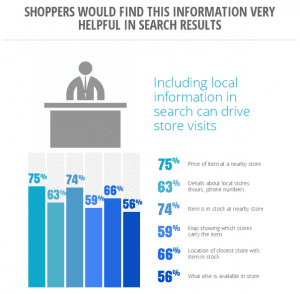
1. Including Local information in Search can drive Store Visits

Whether your business is a Mom-and-Pop shop or a chain store of equally desired products/services, your store information and details regarding those products and services are crucial. A recent Google Study found that 75% of customers are searching for the prices of your products, 66% are searching for the location of the closest store carrying their item of interest, and 63% are searching for your hours of operation, phone number, etc. These critical elements are high priority to Holiday shopping advertising, and all play a role in a consumer’s readiness to buy and likeliness to choose your company.

2. Over 50% of Shoppers will go to a Brand’s website to look for Coupons

“Best Price Guaranteed”, “Lowest Price around”, “Competitor Coupons Accepted” – all phrases your customers are hearing from your competitors. Keeping up to date coupons readily available for your buyer can change their “I want” ’s to “I need” ’s. This recent infographic by Adweek details more of shopper’s wants. Offering exclusive or custom coupons is also a habit that leaves your shopper feeling special and more likely to come again. These coupons, coupon codes, and premium offers can be advertised around the globe easily by Television, Email, Newspaper(s), Print Mail, on your Website, and more. Don’t let your customer find a better deal while shopping during this holiday season.

5 Facts that Impact Holiday Shopping Advertising
This image is part of an infographic from Google’s recent Mobile Search Study. Learn more

3. 90% of users use Screens simultaneously to Accomplish a Task

Your next customer can be on their phone, tablet, desktop, or laptop, searching for your products and services. Can they find you? Can your website fit a tablet, cell phone, or desktop screen quickly and seamlessly? When April’s Mobilegeddon was fast approaching, Mobile-Friendliness was top of mind and high priority. A user’s experience across all devices should be top of mind and crucial to your website’s design. Advertising your products and services within an environment that can be easily compressed and expanded to become compatible with your customer’s screen is highly beneficial when optimizing for the upcoming Holiday shopping advertising season. This Mobile Search study, The New Multi-screen World, details more pertinent facts such as 67% of users use multiple screens for their online shopping needs.

4. Last Year, 40% of Holiday Shopping Occurred Online

Google’s Recent Study “5 Holiday Shopping Trends to Watch in 2015” detailed the differences we’ve seen with shopper’s online presence and intent to stay there. 41% of shoppers purchased from a new retailer, which is a significant jump from 2013. Your company’s online presence should be relevant and engaging to appeal to all shoppers. Creating a marketing strategy to outline your company’s “plan of attack” to grab your future customer’s attention is key.

5. 22% of consumers feel most influenced by Emails sent directly from a Brand

Email marketing has become second nature for advertising and marketing initiatives. Simple online Customer Relationship Management (CRM) tools such as MyEmma.com and SalesForce.com allow businesses to not only create email marketing initiatives, but also connect to and keep track of prospects and important customer relationships that may otherwise be left behind. Emails sent to customers may detail upcoming events, sales, coupons, etc. that your retail business may be offering. Holiday themed emails, company “Christmas Cards”, and special Holiday savings are key holiday email marketing strategies to plan for.

Holiday Shopping Advertising Recap

In conclusion, digital marketing efforts during the holiday season are essential for Ecommerce/Retail businesses. Assuring that your company’s local information is up-to-date will lead to more in-store purchases. Offering coupons to within your company’s website will in turn create a unique user experience for your customers. Guaranteeing that your business’ website is easily adjustable for various screen resolutions and devices sizes will lead to a better user experience, and in turn, higher ROI. Your company’s plan of attack should address your business’ online presence and how to engage more frequently with consumers. Email marketing utilizing CRM’s allow customers to gain a feel for your brand and offerings with personalized messages that may lead to more inquiries and more purchases. Creating a sound strategy to encompass these Holiday shopping advertising thought-provoking statistics and facts, may lead to a better brand and better customer experience alike.

Sign up for our Newsletter or Get Social to find out more facts that can impact your business’ success!

Filed Under: Ecommerce & Retail Marketing, Email Marketing, Marketing Strategy, Mobile Marketing Tagged With: digital marketing, marketing

The Social Media Metrics That Matter

September 16, 2015 by Dabrian Marketing Group Leave a Comment

Today, social media is growing and changing the way people and businesses do business.  81% of small and medium sized business are now on social media. With so much emphasis on social media, your company should want to keep up with all of the latest trends and set business goals for your social media, like brand awareness and sales and goals for your and your social media metrics. Your business may not have the time or manpower to keep up with the latests trends or to keep up with your followers, so you may need to hire an agency to fulfill all of your business’ social media needs. When you begin looking for an agency or someone to manage your company’s social media accounts, there are many things you want to look for but be aware when you are doing your research because you may become victim of perception vs. reality.

Perception vs. Reality

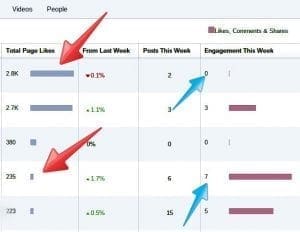
When it comes to social media, perception vs. reality claims many victims without them even knowing it.  When looking for an agency to manage your social media accounts the perception may be that one agency has this many “likes” or followers or another agency who does the exact same thing, but they have fewer “likes” or followers. Does that mean that this one agency is better than the other or better equipped to get the job done just because they have more “likes” or followers?

It is important for business owners to understand that choosing an agency for what they offer you on the surface (perception) may not be what you want and may not be the best for your business. If you choose the agency with more “likes” or an agency for their name, you might be paying for what you think they can do for you on the surface, but you are not truly getting what you asked or for or what your business needs.

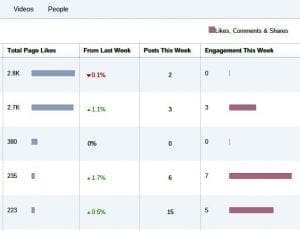
social media metrics that matter

Risk vs. Return

Risk and return also come into play when dealing with social media. The risk for a company may include the financial cost of Social Media Management vs. the return of acquiring a lot of followers or the return of acquiring a few followers that interact with the company and are customers.

The Metrics that Matter

All business have goals and objectives, and when your business is looking for someone to manage your social media accounts you want to look for an agency that aligns with your business goals. Sure an agency can help your business “pay” for likes on your social media platforms, but is that what you really want?

You should look at an agency’s engagement rates, rather than select someone based on how many “likes” or followers they have.  These numbers should matter more to you because it shows that they are posting more relevant content, reaching their target audience, and are making a bigger impact.

social media metrics that matter

Even though most people want to believe perception vs. reality, trust the experience, partnerships, engagement of an agency and their ability to deliver on your goals and do not base your decision by what it appears they can do for you.

Are you a victim of perception vs. reality?  Comment below to share your insights!

Filed Under: Social Media Marketing & Management Tagged With: Social Media Metrics

Data Import Tools Review

September 9, 2015 by Dabrian Marketing Group Leave a Comment

What is Data Importing? 

Data Importing is a process that is extremely beneficial for your business. In this case, data importing is based on the concept of getting cost data from social media websites such as Twitter and/or Facebook into Google Analytics. These data import tools provide you an easier way to import your cost data. These tools can save you time and help your business grow!

How will these tools impact your business?

Do you know where your advertising spend is going? You should know the tools you can use to import data into Google Analytics, so you know where your advertising spend is going and know what ads and campaigns have positive returns. This will help you make quick and efficient decisions. Knowing what your options are, can help you decide what you need and what is important or best for your business. Although you can manually import data, there are other ways that can be less time-consuming, but costly. Each of these platforms are different and have special features, but which tool is right for your business?

Supermetrics 

Supermetric is a tool that lets you import advertising cost data from any external advertising sources into Google Analytics. You can schedule automatic daily uploads from Facebook Ads, Bing Ads, Twitter Ads, and Linkedin Ads or upload CSV files from any data source. You can also connect Supermetrics to Bing Ads or Facebook Ads and set an outgoing daily upload.This way the information from Bing Ads and Facebook Ads will automatically connect to Google Analytics through Supermetrics.

This means less work is required and no formatting needs to be done, which saves time. The benefits of this tool include importing your cost data, seeing your advertising cost, and measuring advertising Return On Investment (ROI) in Google Analytics. Supermetrics combines your advertising cost data with Google Analytics ecommerce and goal conversion metrics to see if your campaigns are paying off. The only con for this tool would be the cost associated to purchase it. To schedule automatic uploads for each social media platform, the cost is separate, so the cost for Bing Ads, Facebook Ads, and file uploads are all different. Supermetrics has many things to offer, but is it the right fit for your businesses needs?

NEXT Analytics

NEXT Analytics is a tool that imports advertising cost data from external advertising sources such as Bing Ads and Facebook Ads into Google Analytics. This allows you access to the reports of all your advertising costs and their effectiveness. NEXT Analytics processes or formats the CSV file of the cost data for you, but it doesn’t do it for you completely. In order to format the data completely, you would need to filter or fix the data yourself. The good news is that you would only have to do this once because all of your actions are recorded, which can then be automatically reinforced each time you want to import cost data into Google Analytics.

With this tool, you can upload any number of accounts to a single license. In this case, a single license would mean that NEXT Analytics would be entitled to that one computer, but if needed you can always transfer the license to another computer. The one factor that needs to be considered is that there is a limited number of times you can transfer the license. One opposing factor would be that you can only upload seven dimensions and ten metrics, and another is the cost associated to purchase it. The cost depends on how much data you import. This can be purchased monthly or annually. The good news is that with NEXT Analytics, you can replace previous uploads. This allows us to add up to 19 more uploads to the original data set, this is useful if you have a lot of data to upload. NEXT Analytics is one tool out of many to import your data into Google Analytics.

Analysis Engine 

Analysis Engine is a tool that helps you to import advertising cost data from external advertising sources such as Bing Ads and Facebook Ads into Google Analytics. It automatically syncs Bing Ads cost data into Google Analytics, and then automatically imports the cost data. In order to automatically import the cost data into Google Analytics, you have to connect Bing Ads to Analysis Engine and then connect Google Analytics to Analysis Engine. This tool can help you determine your ROI and Return on Assets (ROA), provide reporting on your cost benefit marketing efforts, and much more. The cost of the tool isn’t provided right away, but you can request a demo for more information. Analysis Engine has many features for you to use, could this be the tool you are looking for?

Analytics Canvas 

Analytics Canvas is a tool that imports cost data from external advertising sources such as Bing Ads into Google Analytics. It allows you to check your marketing spend across multiple sources and campaigns. It can automatically link and import your cost data to Google Analytics if you have connected it to Bing Ads or another source. Analytics Canvas lets reports be automated, so it can be refreshed every day. This provides you with the information you will need, and it is easily accessible. One con of this platform or tool may be the cost. Depending on what features you may need, the cost will vary. Analysis Canvas has additional features that may interest you, but may hinder you because they are not needed or necessary for your business.

Analytics-Toolkit

Analytics-Toolkit is a platform that lets you import cost data from external advertising sources into Google Analytics. However, Analytics-Toolkit may limit your prospects. You have to manually get the cost data (CSV file) from the source (Bing Ads, Facebook Ads, etc.) and then use Analytics-Toolkit to upload and format the data. One issue that can come up is that the data is limited to a 90-day time period. Additionally, the cost can vary, but is relatively lower than most tools that help assist with importing cost data. Analytics-Toolkit is one of many options to choose from, but is it your cup of tea?

The great benefit of having a tool to import your cost data is that it allows you to adjust where your spend is going. Knowing what tools you can use to import data into Google Analytics can help you decide what fits your business best needs and how it will help your business grow, gain sales, and customers.

Start using these tools to import your data, check and see which tools best fits your needs. Contact us today or leave us a comment below for more advice or information!    

Filed Under: Digital Analytics, Ecommerce & Retail Marketing, Google Analytics Tagged With: Data Import Tools, Google Analytics

Are Your Wasting 25% of Your Pay per Click Budget?

September 3, 2015 by Dabrian Marketing Group Leave a Comment

Study shows that small businesses waste 25% of their Pay per Click budget! Learn how working with a PPC certified individual/agency could help you maximize the return from your PPC advertising.

Check out our Google Partners Profile Page and Bing Ads Accredited Company Profile Page

Read Transcript

Hi, Justin Miller here from DaBrian Marketing Group, and I want to talk to small business owners, and small businesses in general that are running pay per click advertising. There was a study done not too long ago, that shows that up to a quarter of their pay per click budget is being wasted, and how and why is this being wasted? It has to do with not being knowledgeable of the platforms, and how to properly target your ads, as well as just not having the time to properly manage them, and keep them up to date. So, how can you be sure that you’re not wasting 25 percent of your PPC budget? If you need help, looking for a certified agency, or individual, can help cut down that waste, and maximize the return.

What's Exactly Does PPC Certified Mean?

But how do you know who is certified, and what exactly does it mean to be certified? So, let’s look a little bit more into that. First off, if you want to run Bing Ads, you’re definitely going to want to look for someone that is Bing Ads certified. What does this mean? It means they’ve passed the knowledge based test.So Bing Ads has put together a test to make sure that these individuals have the knowledge of how to set up, how to run, maintain, and keep up with best practices using the Bing Ads platform, which reaches not just Bing, but also Yahoo Search, as well as Apple’s IOS, on mobile devices. So you can see here, I’m logged in to my account, and I have passed this test. I am one of several that are, Bing Ads certified.

What to Look for with a PPC Company?

And what you want to look for, as a small business owner, is this accreditation badge. If you see that badge on somebody’s website, that indicates that that individual, or at least that agency, has someone in house that’s employed, that has passed this test, and has proven that they’re knowledgeable and successful at running a Bing Ads campaign. Okay, so that’s Bing Ads.

What's Required to be Google AdWords Certified Individual?

Next up is Google. Google has a similar type of test, or series of tests actually. So for Google AdWords, if you want to be Google AdWords certified, you have to pass the fundamentals test, as well as one additional specialized test. The specialized tests include search advertising, display advertising, video, shopping, or e-commerce, as well as targeting mobile devices, and advertising via mobile phones. Again, to be certified in AdWords, you have to pass the fundamentals, which is just a high level basic AdWords, PPC advertising exam, as well as one specialized one.

What's with Value of Working with a Google Partner?

In addition to being a certified individual, companies can earn what is called a partnership, or a Google partner status. Here at DaBrian Marketing Group, we have earned, and maintained that status with Google. So the first step is having at least 1 employee that is certified. We have 2 that are currently certified on staff, and you can see that includes the search and display advertising, as well as some of the other ones that we’ve looked at. Next is, maintaining best practices. So, pay per click as an industry is constantly changing, there’s constantly new updates, and the best practices on how you use these new features, constantly changes along with them. So you have to maintain these accounts, your client accounts, and make sure that you’re keeping up to date with best practice. So here you can see that there’s a minimum requirement, and then the average Google partner’s, requirement, and then where DaBrian Marketing Group currently sits, as far as maintaining best practices.

Why Does it Matter if You Work with a Google Partner?

Next up is experience. You have to show that at least 60 out of the last 90 days that you’ve logged in, and you’re active on these accounts. As you can see, we’re well up and above that in staying active every day on our client accounts, as well as managing a minimum ad spend. There’s a minimum spend of 10K, over 90 days, and currently, we’re just shy of 20K. So, the partnership status shows not only that they have knowledgeable staff who can take and pass those tests and exams, but also the experience in managing a sizable amount of budget over the last 3 months, as well as staying up to date with best practices, and really minimizing that wasted spend, that no company wants to pay out money to see no return for.

Is Your PPC Company Certified?

So definitely you want to connect with a certified partner, whether it’s Bing Ads, and or Google Partners, or at least AdWords certified. So, the question now is, is your current agency certified? You can go to Google.com/partners and do a search for that agency, or whomever you’re working with, or if you’re looking for an agency. This is a good place to start, and search around, find a local agency, that fits your needs. Some will require a minimum ad spend, and tit shows the different certifications that they have. If mobile advertising is important to you, you definitely want to find an agency that has the mobile advertising certification. Or e-commerce, you definitely want to look for shopping, and such. So hopefully you have a better understanding of what PPC certified means, and how individuals, as well as companies can go about getting these certifications, and working with them, to really minimize that wasted ad spend. If you have any questions, feel free to leave a comment, or give us a call. The office number is 610-743-5602. Thanks. Have a great day.

Filed Under: Mobile Marketing, Paid Search (PPC) Tagged With: Pay Per Click

Top 5 Technical Issues That Impact Your Organic Search

August 26, 2015 by Dabrian Marketing Group 1 Comment

Optimizing your site to perform well in organic search is not a set it and forget it process. There are several factors that go into determining your site’s positioning in the search engines. In fact, backlinko.com reports (and lists them for you) that Google uses over 205 different factors! While many business owners tend to focus on the visible on-page components such as content and keywords (which are very important), there are several technical issues that often go unnoticed because they are not visible to the end users. These issues listed below greatly impact your business’s organic search results and should be a top priority when creating and maintaining your site.

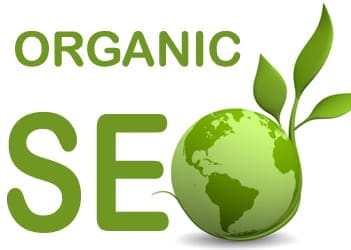
Organic Search
(Image from http://seattleorganicseo.com)

1. Navigation

Before your website appears in a search engine, it must be crawled, and then indexed. During this process, search engines will collect information about your site’s content. Just as users prefer sites that are easy to navigate, so do search engines.

If you wish to perform better in search engines, it would greatly benefit your business to create and maintain a sitemap. A sitemap is a document or a webpage containing all the pages on your site. Search engines evaluate sitemaps to understand the structure of the site. This is regularly done so it is a best practice to make sure this sitemap is being updated when new pages are created.

Your navigation bar is not just for the user either, search engines consider them into their organic search rankings. While (quality) links are always good for your site, not all links are created equal in a search engine’s eyes. Links placed in your navigation bar are deemed more important. Therefore your navigation bar should only contain links that are most valuable to your business. These are the links that generate more traffic and lead to more sales and conversions. Many website owners make the mistake of placing too many links in their navigation. This not only worsens the user experience (which worsens your position in organic search), but it also dilutes the authority/value of your links.

Having descriptive anchor texts, the text that appears highlighted in a hypertext link, is another factor associated with navigation. Having descriptive anchor texts means linking to your pages using content related words and not something generic such as “click here” or “read more.” These generic links tell search engines that the page should be about clicking things, or reading. This appears spammy and can negatively impact your performance in organic search.

2. Site Speed

One of the 200+ factors that Google and other search engines take into account is site speed, or how fast your site finishes loading. Search engines have become focused on providing the best user experience for those searching, so a faster load time to them, means a better experience and will correlate to the improvement of your rankings. Common mistakes that many site owners make that cause slow site speed are things such as large pictures, flash animation, bulky code, and external media. While some of  these things may look nice, it would be wise to reduce or remove them in order to increase site speed. To evaluate your site’s speed, use Google’s pagespeed insight tool.

3. Mobile Capability

On April 21st of this year, Google released an algorithm change requiring sites to be mobile friendly if they wished to perform well in organic search on mobile phones. Before the update, a study from Adobe reported that 45% of business did not have a mobile friendly site. To be mobile friendly, search engines such as Google recommend using a responsive design. This means that all your site’s content will remain the same for all users, it will just appear differently depending on the device the user is using. For more information about the update, please read my blog on Google’s Algorithm change posted near the time of the release.

4. Duplicate Content

Most business owners are aware that copying content from other sites is not only unethical, but will result in a ranking penalty from search engines. However, many are not aware of the internal duplicate content happening on their site right now. When a user visits a specific page, a URL is generated based upon the path they take. For example, a user may search Amazon looking for a cellphone, and once there, they decide they want a smartphone so they click on the smartphone section. After going to that section, they click on their desired phone (let’s say an Iphone 6).  Their URL will look something like this: Amazon.com/cellphone/smartphones/Iphones/Iphone6. Now let’s say another user knows exactly what they want. They go to Amazon and enter in the search bar “Iphone 6.” Their URL will be shorter and look something like this: Amazon.com/iphone6. While this is the same page, they have two separate URLs. Search engines will recognize them as two separate separate pages with duplicate content. Google lists solutions and explanations on how to deal with duplicate content.

5. Include a Robot.txt file

A Robot.txt file is used to direct search engines when crawling. It’s usually used to prevent search engines from indexing specific pages and files. So why would you want to prevent search engines from crawling any part of your site? Let’s say for example you are in the process of updating your site. You’ve began adding pages but they aren’t complete yet. If a search engine were to crawl those pages, they would not perform well in organic search due to lack of content. That places you in a uphill battle from the start. A similar issue arises when you are performance testing different layouts for pages. The pages have identical content, but you wish to see which layout users prefer. A Robot.txt file will tell search engines not to crawl these pages yet until you are finished or have picked a layout. Another reason would be to prevent search engines from penalizing you for duplicate content. For example if you have a print version of a page, you can tell search engines not to crawl it.

Learn more about Robot.txt files.

Performing well in organic search is essential for a business that wishes to improve digitally. A study done by BrightEdge shows that the majority of web traffic (51%) comes from organic search. That is a huge opportunity to miss out on. While having great content may be the priority in some business owners mind, none of that means anything if your website has the technical issues listed above.

Contact Us today to make sure your site is technically sound to perform well in organic search!

By: David McDowell

Filed Under: Mobile Marketing, Search Engine Optimization (SEO) Tagged With: Organic Search

  • « Go to Previous Page
  • Page 1
  • Interim pages omitted …
  • Page 21
  • Page 22
  • Page 23
  • Page 24
  • Page 25
  • Interim pages omitted …
  • Page 48
  • Go to Next Page »

Primary Sidebar

Archives

Categories

Subscribe Now


CONTACT INFORMATION

DaBrian Marketing Group
3535 N. 5th Street HWY
Suite 2, #203
Reading, PA, 19605

  • 610.743.5602
  • Mon - Fri: 9AM - 5PM
Contact Us
Web Support

RESOURCES

  • Case Studies
  • White Papers
  • eBooks
  • Small Business Resources
  • Our Blog

MARKETING

  • Financial Services
  • Health & Wellness
  • Ecommerce & Retail
  • Business 2 Business
  • Business 2 Consumer

VISIT OUR LOCATION

  • Get Map & Directions

CONNECT WITH US

Facebook Instagram Linkedin Rss Twitter Youtube

Copyright © 2026 DaBrian Marketing Group  •  All Rights Reserved  •  Privacy Policy •  Terms & Conditions

Scroll Up